
The Complete Guide to Print & Apply Systems for E-Commerce Fulfillment
Fulfillment Automation · Complete Guide
The Complete Guide to Print & Apply Systems for E-Commerce Fulfillment (2026)
A print & apply system prints a variable barcode or shipping label and presses it onto a box or bag in the same automated motion — no operator, no separate label station. This guide breaks down how the components work, what actually separates a good system from a bottleneck, and which configurations fit an e-commerce fulfillment operation shipping anywhere from a few hundred to tens of thousands of parcels a day.

FIG. 1 — Core data and label path of an integrated print & apply system
What Is a Print & Apply System?
A print & apply system is built from three parts working as one machine: a print engine, a label applicator, and a controller that ties them to your order data.
The print engine is a high-speed thermal printer built for continuous industrial use rather than office bursts — it pulls the label stock, prints the variable barcode or address, and feeds it to the applicator. The applicator is the mechanism that physically presses that label onto the box, bag, or carton, usually by tamp, merge, or air-blow. The PLC (programmable logic controller) sits between them, timing the print-and-apply cycle and pulling order data from your warehouse or business system in real time.
In e-commerce fulfillment, that third piece is what separates a real print & apply system from a printer sitting next to a labeling station. A system connected to your WMS or ERP pulls live tracking numbers and carrier barcodes as each package arrives — no batch file, no operator scanning a pick list to match labels to boxes.
Most e-commerce operations land on one of three system types: a dedicated label applicator for boxes and mailers already formed, an auto bagger that seals and labels poly bag orders in one pass, or a carton sealer that sizes, tapes, and labels boxed orders together.
Label Application Methods Compared
Print engines vary mostly in resolution and speed. Applicators vary in how they physically get the label onto the product — and the geometry of your line usually decides which one fits.
| Method | How It Works | Best For |
|---|---|---|
| Tamp-Blow | A vacuum holds the label on a pad; the pad moves into position, then a short burst of air presses the label onto the surface. | Lines with inconsistent product speed or brief stops at the label station — the most common method in e-commerce fulfillment. |
| Merge | The label meets the product directly off the print engine as it passes, with no separate pad motion. | High-speed, steady conveyor lines with consistent product spacing and minimal height variation. |
| Air-Blow | A jet of air fires the label onto the product from a set distance, without any part of the applicator touching the surface. | Fragile, uneven, or curved surfaces where a tamp pad can't sit flush against the product. |
For a deeper technical breakdown of how these methods are engineered, CTM Labeling Systems' guide to print and apply components is a solid reference.
How to Choose the Right System for E-Commerce Fulfillment
Five factors separate a system that runs quietly for years from one that becomes the packing line's weakest link.
| Criterion | What to Look For | Why It Matters |
|---|---|---|
| Throughput | Boxes or labels per minute at your real peak volume, not the vendor's best-case number. | A system rated for 30/min but only tested at 15 will bottleneck packing the moment order volume spikes. |
| WMS / ERP Integration | A native, real-time connection to your order system — not a manually uploaded batch file. | Live data pulls remove the mislabeling risk that comes from working off a stale file. |
| Label Materials & Resolution | Direct thermal vs. thermal transfer, and 203 vs. 300 dpi print resolution. | Dense barcodes and small text need higher resolution; direct thermal labels fade in heat and won't hold up long-term. |
| Scalability & Customization | Modular nose units and an adjustable footprint for your box or bag size range. | SKU mix changes as a catalog grows; a fixed-configuration machine doesn't. |
| Vendor Support & Total Cost | Local service response time and spare-parts lead time — not just the sticker price. | An hour of downtime on a packing line typically costs more than the difference between two machines' price tags. |
See the full YPXPACK print & apply lineup for configuration options against each of these criteria.
Top 7 Print & Apply Systems for E-Commerce Fulfillment in 2026
These seven span the range e-commerce operations actually evaluate — YPXPACK's integrated print-apply-PC lineup first, then an honest modular alternative for edge cases.
01YPX-T50B1 Shipping Label Applicator with Print & Apply & PC★ Editor's Choice
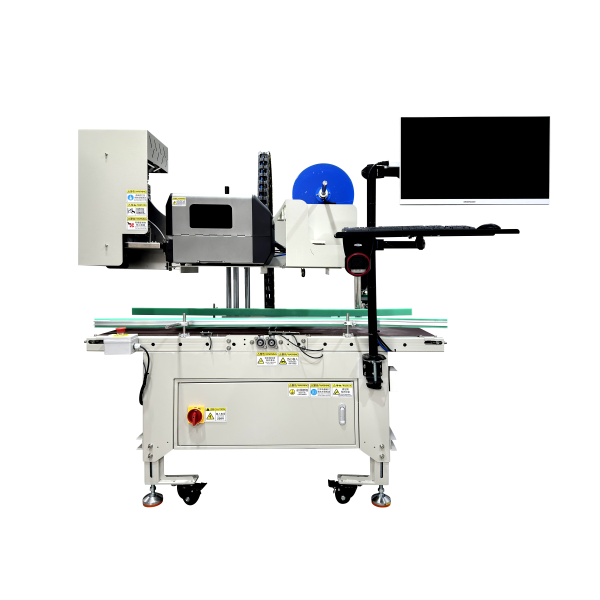
The T50B1 is YPXPACK's dedicated shipping label applicator — an all-electric print, apply, and PC unit built specifically for outbound parcel labeling. It's the closest match to what "integrated print & apply" means for e-commerce fulfillment: one machine, one vendor, one label station, instead of a print engine from one supplier bolted to an applicator from another.
| Speed | Up to 25 boxes/min |
|---|---|
| Print resolution | 203 / 300 dpi (specifiable) |
| Control | 7" touchscreen PLC |
| Power | 1500W · 100/220V, 50/60Hz |
Key features: an optical sensor detects each box automatically before labeling; the tamp applicator is rated to 25 boxes per minute; print media runs up to 4" wide, 1.97"–7.87" long, on folded thermal stock; and it pulls order data in real time from a connected WMS/ERP.
Strengths
All-electric drive removes the compressed-air line that pneumatic tamp units depend on, so the T50B1 can be repositioned on the packing floor without new air drops. The 7-inch touchscreen exposes label format and application-timing settings directly, instead of requiring a service call for basic changes.
Honest Tradeoffs
At roughly 220 lbs and a five-foot footprint, it's sized for a dedicated packing station, not a tight bench — and the print engine tops out at 4" label width, so oversized freight labels need a different unit.
02YPX-WBD60A Horizontal Drop-Style Tabletop Auto Bagger with Print & Apply & PC
The WBD60A bags product horizontally before printing and applying a label in the same cycle, built for items too long or flat to drop-load into a vertical bagger. Most tabletop baggers assume a vertical drop; the WBD60A's horizontal load path is the difference for apparel, flat goods, and multi-item polybag orders.
Key features: horizontal loading orientation for long or flat items; integrated print, apply, and PC control in one unit; a tabletop footprint with standard poly bag stock compatibility; and the same touchscreen PLC interface shared across the YPXPACK line.
Strengths
Horizontal loading avoids the product settling or shifting mid-bag that a vertical drop can cause with longer items. Running print, apply, and bagging as one motion removes the separate labeling step a standalone bagger would still need.
Honest Tradeoffs
It's built for a defined product-length range — very short or very tall items are better matched to a drop-style unit like the BD60C.
03YPX-K75A1 Right-Size Auto Bagger with Print & Apply & PC
The K75A1 adjusts bag size to the product before sealing and labeling, cutting the void-fill and oversized-mailer waste that flat-rate bagging creates. Dimensional-weight shipping charges by package size, not product size — right-sizing is the direct lever for that cost.
Key features: automatic bag-size adjustment per product; optical product sensing before seal and label; integrated print, apply, and PC control; and a touchscreen PLC shared across the platform.
Strengths
Right-sizing shrinks the shipped package to the product's actual footprint, which directly lowers dimensional-weight billing on carrier invoices. It also removes the manual step of an operator picking bag size by eye.
Honest Tradeoffs
Highly irregular or multi-item orders need a wider size range than a single right-size unit is tuned for — those runs may still need manual bagging or a second machine.
04YPX-BD60C Drop-Style Tabletop Auto Bagger with Print & Apply & PC
The BD60C is YPXPACK's standard drop-style tabletop bagger with print, apply, and PC control built in, sized for compact packing stations. It's the smallest-footprint member of the print-apply-PC line, which matters when floor space — not throughput — is the constraint.
Key features: vertical drop-style loading; a compact tabletop footprint; integrated print, apply, and PC control; and standard poly bag stock compatibility.
Strengths
The tabletop footprint fits packing stations that can't accommodate a floor-standing, conveyor-integrated unit. Vertical drop loading keeps the operator motion simple: load, drop, seal-label-apply in one cycle.
Honest Tradeoffs
Tabletop scale caps throughput below the conveyor-integrated models — high-volume single-lane operations will outgrow it faster than the WBD60A.
05YPX-ZFD50B1 Automatic Right-Size Carton Sealer with Print & Apply & PC
The ZFD50B1 combines carton right-sizing, tape sealing, and print-apply labeling into a single inline pass for boxed orders. It targets the same dimensional-weight problem as the K75A1, but for cartons instead of poly bags.
Key features: automatic case-size adjustment; inline tape sealing; integrated print, apply, and PC control; and a conveyor-ready design.
Strengths
Sizing, sealing, and labeling in one pass removes two handoffs a separate case-sizer, tape sealer, and label station would otherwise require. That consolidation is where most of the labor savings comes from, not the labeling step alone.
Honest Tradeoffs
It's built around a defined carton size range — product lines with highly variable case dimensions need that tolerance checked against actual SKU data before ordering.
06YPX-ZFDC50B1 Cross-Type Automatic Right-Size Carton Sealer with Print & Apply & PC
The ZFDC50B1 adds cross-belt sealing to the ZFD50B1's right-size-and-label design, built for higher-volume carton lines running heavier or wider boxes. Cross-type sealing applies tape from both the top-bottom and side belts in the same pass, which standard single-axis sealers can't do without a second pass.
Key features: cross-belt (dual-axis) sealing; automatic case-size adjustment; integrated print, apply, and PC control; and a conveyor-integrated design.
Strengths
Dual-axis sealing holds heavier or wider cartons more securely than single-belt taping, once case weight climbs past what a light bagged order needs. It keeps the same one-pass sizing-sealing-labeling flow as the ZFD50B1 at higher line volume.
Honest Tradeoffs
The cross-belt mechanism adds footprint and mechanical complexity over the standard ZFD50B1 — it's a step up for volume and case weight, not a default for every carton line.
07Modular Component Systems (Separate Print Engine + Applicator)
Instead of one integrated unit, some operations pair a standalone print engine — commonly Zebra or SATO — with a separate applicator from a labeling-systems manufacturer, connected through a shared PLC. This is the right call when a facility needs label application at multiple, non-standard points on the line that no single packaged unit covers.
Key features: independent print-engine and applicator selection; mix-and-match tamp, merge, or air-blow nose modules; custom PLC integration across vendors; and a component-level upgrade path over time.
Strengths
Component independence means the print engine and applicator can each be swapped or upgraded without replacing the whole system, and nose modules can be mixed for irregular labeling points on one line.
Who It's Not For
It isn't a plug-and-play purchase. Integrating engine, applicator, and PLC across vendors is a systems-integration project, and support means coordinating multiple vendors instead of one when something fails.
Integrating Print & Apply into Your E-Commerce Fulfillment Workflow
Objective: get a print & apply unit reading live order data and applying correctly formatted labels on the first production run, not the fifth.
Prerequisites: WMS/ERP API or EDI access, a finalized label template validated against carrier barcode requirements, and a test SKU set that covers your smallest and largest package.
- Confirm your WMS/ERP can push order and tracking data to the print engine in the format it expects — ZPL, EPL, or a vendor-specific protocol.
- Load and test the label template against actual carrier barcode requirements before connecting live orders.
- Run the system on a held-back batch of real orders, not synthetic test data, and check every label against the packing slip.
- Tune application-timing settings — tamp delay, conveyor speed sync — against your slowest and fastest SKUs.
- Cut over a single lane first; hold parallel manual labeling as a fallback until read-rate is confirmed.
Common pitfalls: the two failure points that show up most are label lag, where the applicator fires before the print engine finishes, and misalignment when box height varies more than the sensor range accounts for.
How to verify it worked: run a scan-rate test — pull 100 labeled boxes and scan every barcode. Anything below roughly 99% read rate points back to print resolution, label material, or sensor calibration, not the applicator itself. Precision Warehouse Design's systems overview covers how print & apply fits into a broader material-handling integration if you're rolling this into a larger conveyor project.
What Print & Apply Automation Actually Saves an E-Commerce Fulfillment Center
The labor cost isn't in printing a label — it's in the walk, align, and press cycle a person repeats thousands of times a shift.
Manual label application typically runs several seconds per package once an operator walks to a workstation, aligns the label, and presses it down. Automated tamp or merge application removes that motion entirely and applies at whatever rate the print engine and conveyor support — commonly in the 20–30+ boxes-per-minute range for tabletop and conveyor-integrated units like the ones in this guide.
For a fulfillment center running one packing lane at meaningful volume, that's the difference between labeling being a line item on the packing budget and labeling being invisible. Full FAQ answers on cost and integration timelines are below, or browse the YPXPACK FAQ directly.
Frequently Asked Questions
How much does a print & apply system cost?
Pricing is quote-based and scaled to configuration — print engine resolution, applicator type, and conveyor integration all move the number. Expect quotes to vary more between a tabletop unit and a conveyor-integrated cross-sealer than between two vendors selling the same class of machine. Request a configuration quote once you know your rough speed and package range.
How long does integration with an existing WMS take?
For a system with a documented API or EDI connection, initial data integration typically takes days, not weeks. The longer variable is label-template validation against your carriers' barcode requirements, which is worth testing before going live.
What label materials work with print & apply systems?
Direct thermal labels (no ribbon, less durable, fine for short-lived shipping labels) or thermal transfer with a ribbon (better durability, needed for content that must stay legible for weeks). Most e-commerce shipping labels run direct thermal since they only need to survive transit.
Do I need a different system for boxes versus poly bags?
Usually yes. Carton sealers handle box sizing, sealing, and labeling; auto baggers handle poly bag sizing, sealing, and labeling. Operations shipping both formats typically run separate lines rather than one machine for both.
How often do print & apply systems need maintenance?
The print head and label sensor are the components to watch — both accumulate adhesive residue and paper dust over time. Vendor-recommended cleaning intervals typically run weekly to monthly depending on volume; skipping it is the most common cause of print-quality complaints.
Next Step
Talk to YPXPACK About Your Configuration
Every system in this guide is quote-based and configured to your box or bag range, conveyor layout, and target throughput.
Get a Quote →These figures reflect the per-unit design speeds published for automated tamp, merge, and air-blow applicators generally, not a guaranteed rate for any specific SKU mix — box weight, label count per order, and conveyor speed all move the real number. Pricing throughout is quote-based; request a configured quote for numbers specific to your operation.

